

YouTube Thumbnail Size 2026 (3840×2160 Recommended, 640px Minimum, 2MB Mobile Limit)
YouTube now recommends 3840×2160px thumbnails. I saved one thumbnail at several sizes and formats to see what fits under the 2MB mobile upload limit, and tested how big the title needs to be to stay readable in small suggested-video lists.
Search for YouTube thumbnail size and most guides still say "1280×720." But as of September 2026, YouTube's Help Center recommends 3840×2160px (4K). Bigger thumbnails mean bigger files, and uploading from a phone has a 2MB limit. I saved the same thumbnail at several sizes and formats to measure file size, and checked whether the title stays readable when the thumbnail is shown small.
Bottom line: make thumbnails 16:9. Upload at 3840×2160 from a computer, or 1920×1080 as JPG quality 90 (about 950KB) from a phone. A 4K JPG at quality 90 came out at 2.8MB—over the 2MB mobile limit. And set the title at 100px or more on a 1280×720 canvas so it's still readable in small suggested-video lists.
YouTube thumbnail specs (2026)
| Item | Regular videos | Shorts |
|---|---|---|
| Recommended resolution | 3840 × 2160px | 2160 × 3840px |
| Aspect ratio | 16:9 | 9:16 |
| Minimum size | 640px wide | 640px tall |
| File formats | JPG, PNG and others | JPG, PNG and others |
| File size limit | 50MB on desktop · 2MB on mobile | 50MB on desktop |
-
Custom thumbnails require a verified account.
-
The older 1280×720 still works because it's above the 640px minimum width, but 1920×1080 or larger looks sharper on big screens.
-
Specs follow the YouTube Help Center as of September 2026. Double-check before uploading.
File size by resolution and format: does it fit under 2MB?
I saved a 16:9 thumbnail—a fall foliage photo with a title—at several sizes and formats.
| Size | Format | File size | Mobile upload (2MB) |
|---|---|---|---|
| 3840 × 2160 | PNG | 14.1MB | Too large |
| 3840 × 2160 | JPG 90 | 2.8MB | Too large |
| 3840 × 2160 | JPG 80 | 1.9MB | OK (barely) |
| 2560 × 1440 | JPG 90 | 1.5MB | OK |
| 1920 × 1080 | JPG 90 | 950KB | OK |
| 1280 × 720 | PNG | 1.9MB | OK (barely) |
| 1280 × 720 | JPG 90 | 474KB | OK |
Saving a photo-based thumbnail as PNG makes it much larger. The 4K PNG was 14MB—fine for the 50MB desktop limit, but impossible to upload from a phone. Save photo thumbnails as JPG. This sample is full of leaves, so it runs large; simpler backgrounds produce smaller files.
Will the title still be readable when it's small?
Thumbnails are often shown small—around 170px wide, like the suggested videos on the right side of the desktop page. I changed the title size on a 1280×720 thumbnail and checked how big it looks when shrunk.
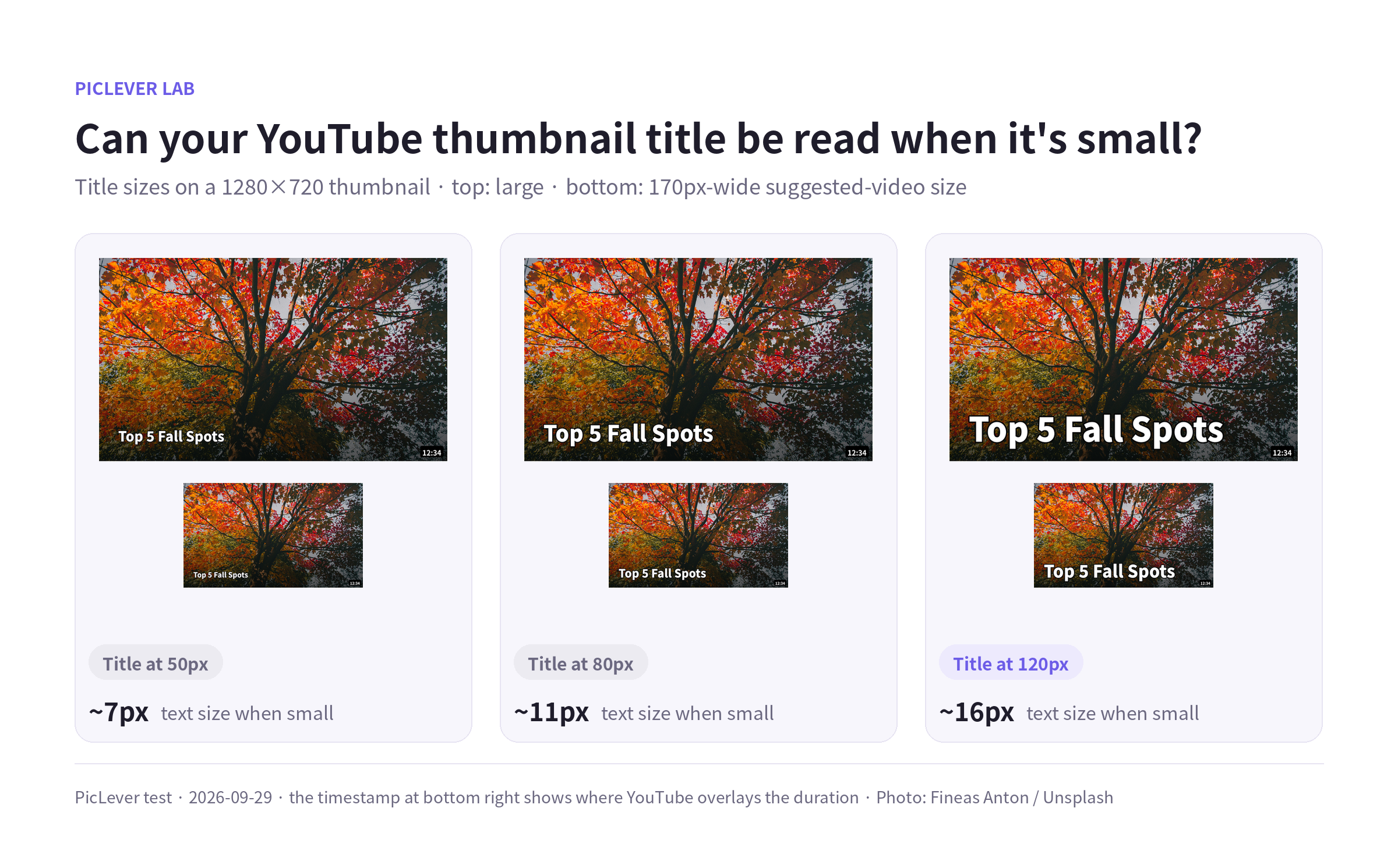
| Title size on 1280×720 | At 170px wide | Readability |
|---|---|---|
| 50px | About 7px | Barely visible |
| 80px | About 11px | Hard to read |
| 120px | About 16px | Easy to read |
Set the title at 100–140px on a 1280×720 canvas, or 300–420px (3×) on 3840×2160. Keep it to a few words, and use white text with an outline or a dark gradient so it stands out on busy backgrounds.
Keep the bottom-right corner clear. YouTube overlays the video length (for example, 12:34) there, which can cover text or faces.
Test setup
-
Sample: a 16:9 thumbnail with a title and dark gradient over a fall foliage photo (Fineas Anton / Unsplash)
-
Created at 3840×2160, resized and saved as PNG and JPG to measure file sizes · Tested 2026-09-29
-
Text sizes were calculated for a 170px-wide display and shown at 2× resolution for a clearer comparison.
Making a YouTube thumbnail with PicLever
-
Crop to 16:9: in the Image Cropper, enter 16:9 values (for example, 1920×1080), turn on Keep ratio and pick the area you want.
-
Resize: in the Image Resizer, set 3840×2160 for desktop uploads or 1920×1080 for mobile uploads.
-
Save as JPG: in the Image Compressor, choose JPG at quality 90 and check the file size. If it's over 2MB, drop quality to 80 or resize one step smaller.
FAQ
Q. Is a 1280×720 thumbnail still OK?
Yes. It's above the 640px minimum width, so it uploads fine. It may look less sharp on TVs or large monitors, so for new thumbnails use 1920×1080 or larger.
Q. What about Shorts thumbnails?
They're vertical 9:16, with 2160×3840px recommended. The orientation is the opposite of regular videos, so prepare them separately.
Q. I don't see the custom thumbnail upload button.
Your account has to be verified to upload custom thumbnails. Check your verification status in YouTube Studio first.
Related posts
-
How to Make a Square Product Thumbnail: Crop vs. Pad, Compared in a Product List
-
Image Too Large to Upload? Photo Size Settings to Hit 100KB, 300KB or 1MB
-
JPG vs PNG vs WebP: I Saved the Same Images in All Three Formats
-
Instagram Image Size 2026 (Feed 1080×1350 · 1080×1440, 3:4 Profile Grid, Stories 1080×1920)