

How to Resize an ID Photo (Korean Passport 3.5×4.5cm, 413×531px, Head Size) 2026
A Korean passport photo is 3.5×4.5cm, and the online file is 413×531px. I cropped the same photo three ways to see whether the head fits the 3.2–3.6cm rule, and covered résumé photo ratios and the steps to size them correctly.
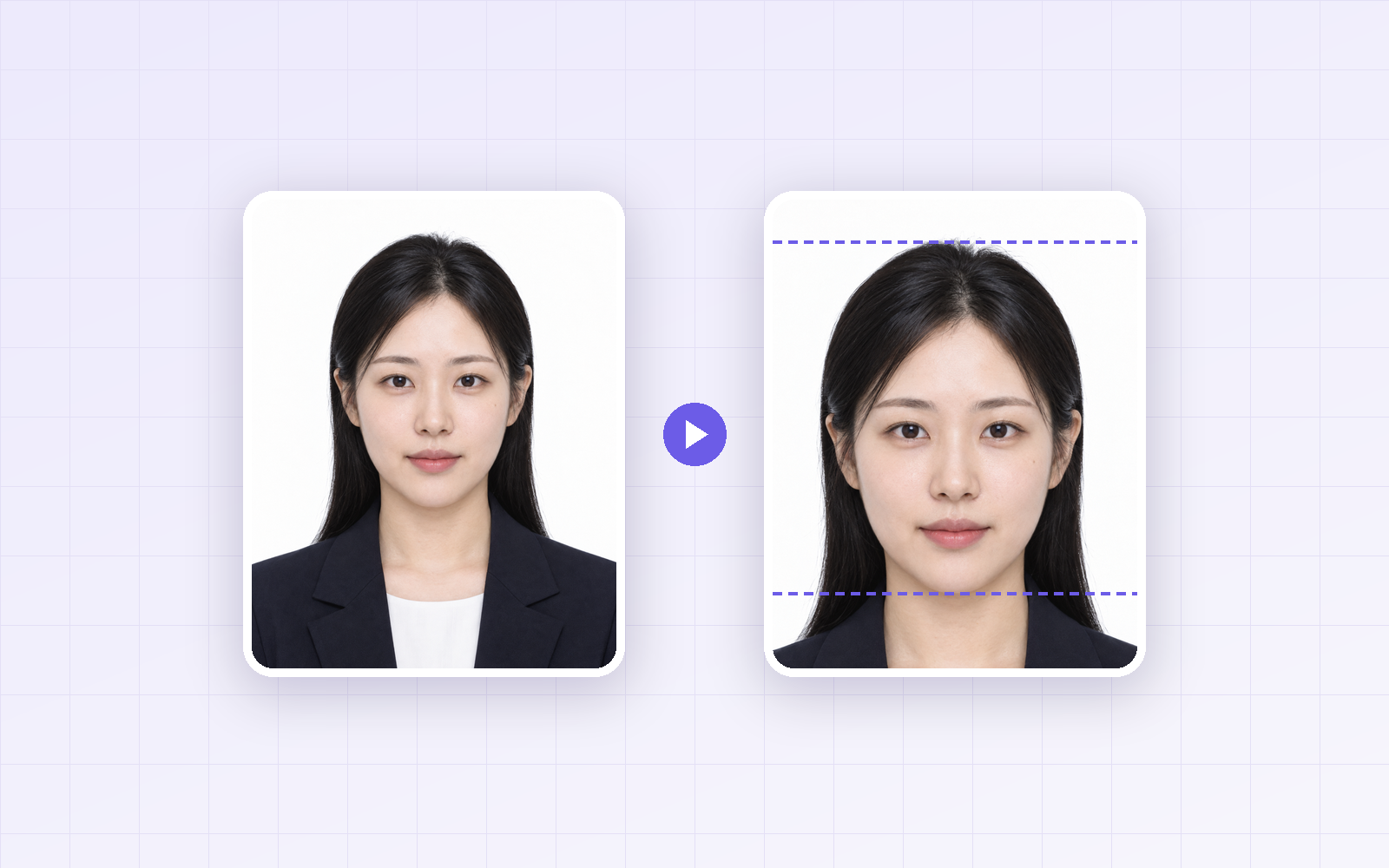
To upload an ID photo for an online Korean passport renewal or a job application, you have to get both the size (cm and px) and the head size right. Cropping a phone photo by eye often leaves the ratio off or the head too small or too large—and the photo gets rejected. Using the Korean Ministry of Foreign Affairs passport photo rules, I cropped the same photo three ways, measured the head height, and checked the file sizes.
Bottom line: a Korean passport photo is 3.5 × 4.5cm (a 7:9 ratio), and the online file is 413×531px. The most common mistake is head size: crop so that crown to chin is 71–80% of the photo's height (3.2–3.6cm). Resized to 413×531px, the JPG was only about 36KB, so file size isn't a concern.
ID photo specs at a glance
| Use | Print size | Ratio | Online file (at 300dpi) |
|---|---|---|---|
| Korean passport | 3.5 × 4.5cm | 7:9 | 413 × 531px (recommended by the Ministry) |
| Korean résumé (half-size ID) | 3 × 4cm | 3:4 | 354 × 472px |
-
Key passport rules (Korean Ministry of Foreign Affairs): white background, taken within 6 months of applying, 3.2–3.6cm from crown to chin
-
Résumé photos: there's no official spec, but 3×4cm is the common choice. Job sites ask for different pixel sizes, so check the upload page first.
-
Passport rules follow the Ministry's passport guide as of September 2026. Double-check before applying. Other countries use different sizes.
How to crop so the head fits the spec
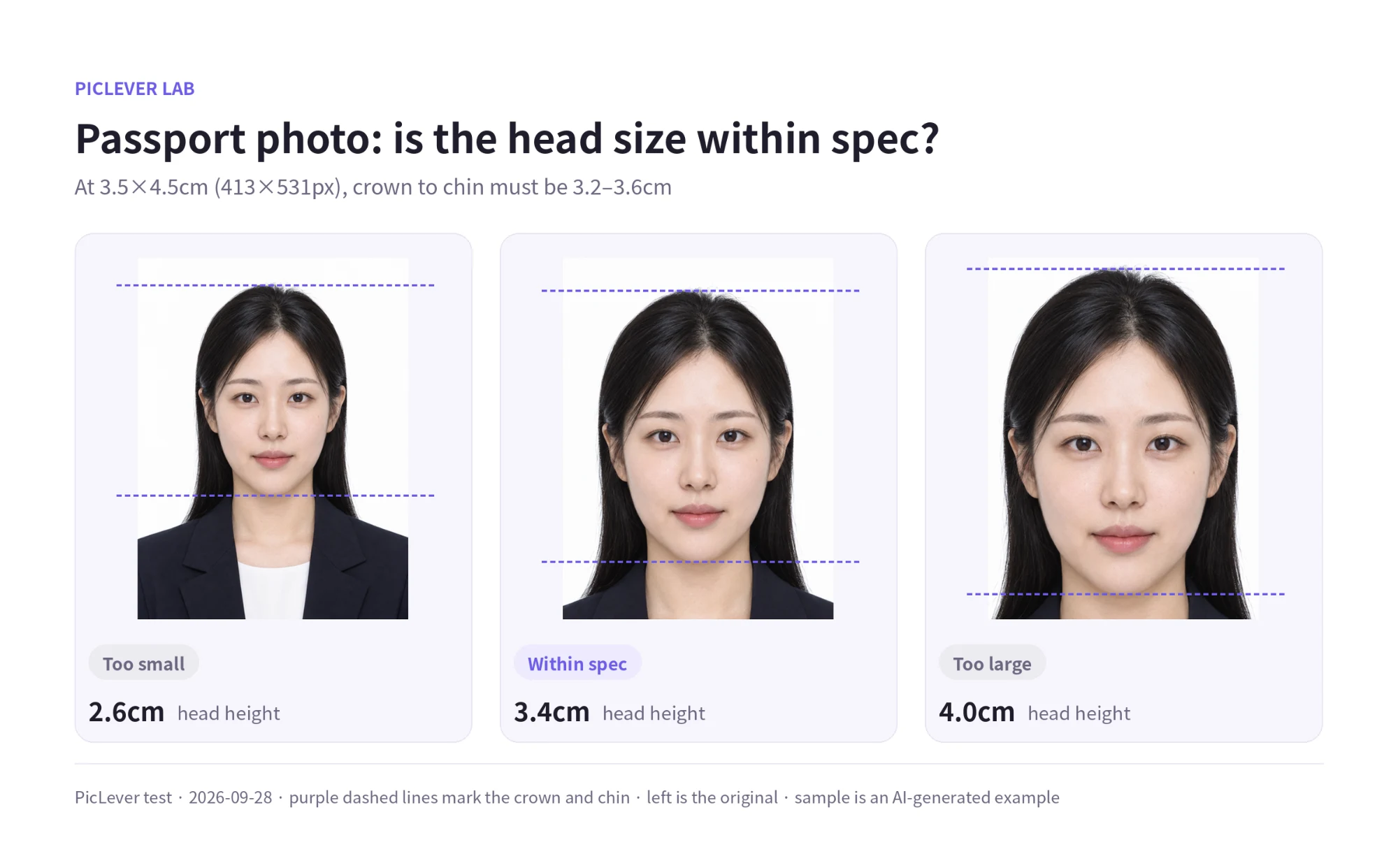
I took a 7:9 ID photo as is plus two 7:9 crops with different head sizes, resized each to 413×531px, and converted the crown-to-chin height to centimeters on a 3.5×4.5cm photo.
| How it was cropped | Head height | Share of photo height | Result |
|---|---|---|---|
| Original as is (down to the shoulders) | About 2.6cm | 58% | Too small |
| Head about 3/4 of the height | About 3.4cm | 75% | Within spec |
| Tight around the face | About 4.0cm | 90% | Too large |
Used as is, the original shoulder-length ID photo had a head height of only 2.6cm—below the spec. Photos framed with plenty of shoulder, like résumé photos, need a tighter crop before you use them for a passport. In a 413×531px file, the head should be roughly 378–425px tall. Leave a little space above the crown, with a bit of neck and upper shoulders showing below the chin.
Why you shouldn't upload the full-size crop
| File | Size | JPG 90 file size |
|---|---|---|
| Cropped to ratio only | 858 × 1102px | 128KB |
| Resized to 413 × 531px | 413 × 531px | 36KB |
If you fix the ratio but don't resize, the file won't match the pixel spec and may be rejected or exceed size limits. Always do two steps: crop (ratio and head size), then resize (pixels).
Test setup
-
Sample: AI-generated example ID photo on a white background, 1106×1422px (7:9, framed to the shoulders; not a real person)
-
The original (head at 58% of the height) plus 7:9 crops with the head at 75% and 90%, each saved at 413×531px, JPG quality 90 · Tested 2026-09-28
-
This test covers sizing only. Check the Ministry's guide separately for other rules like expression, lighting and glasses.
Resizing an ID photo with PicLever
-
Upload the photo to the Image Cropper and choose Rectangle.
-
Enter 7:9 values in the crop settings (for example, width 1400 and height 1800), click Apply size, and turn on Keep ratio. For a résumé photo, use 3:4 (for example, 1200×1600).
-
Resize the selection so the head is about 3/4 of the height, center the face, then crop.
-
In the Image Resizer, resize to 413×531px (or the size the job site asks for) and save as JPG.
FAQ
Q. How do I convert cm to px?
px = cm ÷ 2.54 × dpi. At 300dpi, 3.5cm is 413px and 4.5cm is 531px. If a site specifies its own pixel size, use that.
Q. What if my background isn't white?
A white background is required for Korean passport photos. If yours is gray or patterned, retaking it in front of a white wall is the most reliable fix—resizing won't solve it.
Q. My photo is smaller than 413×531. What now?
Enlarging a small photo makes it blurry. Find the original, or upscale it first with AI upscaling and then crop. For something that gets reviewed, like a passport, retaking the photo is safer.